BLOG OVERVIEW
YouTube Chapters: How to Use Them—And Why They Matter Now More Than Ever
In
YouTube
by
Edward Wood
Chapters are one of the most underused features on YouTube. They take five minutes to add, they improve viewer experience, they boost SEO visibility in both YouTube and Google search, and they provide structural data that helps the algorithm understand your content more precisely. Despite all of that, the majority of business channels I audit don't use them.
When we studied the top company YouTube channels for our content strategy research, the pattern was consistent: even the best channels, including Nothing and Ahrefs, rarely use chapters effectively. It's one of those optimisations that everyone knows about in theory but almost nobody implements consistently, which means doing it can help put you ahead of your competitors.
In the video below I cover the key advantages of chapters—everything from increased watch time to heightened discovery through Google Search and AI tools. Check it out, and subscribe to our channel for more videos just like this.
What YouTube Chapters Are
Chapters are timestamped sections within a video that allow viewers to jump directly to the part they're interested in. They appear as labelled segments on the video's progress bar, in the video description, and in search results as "key moments."
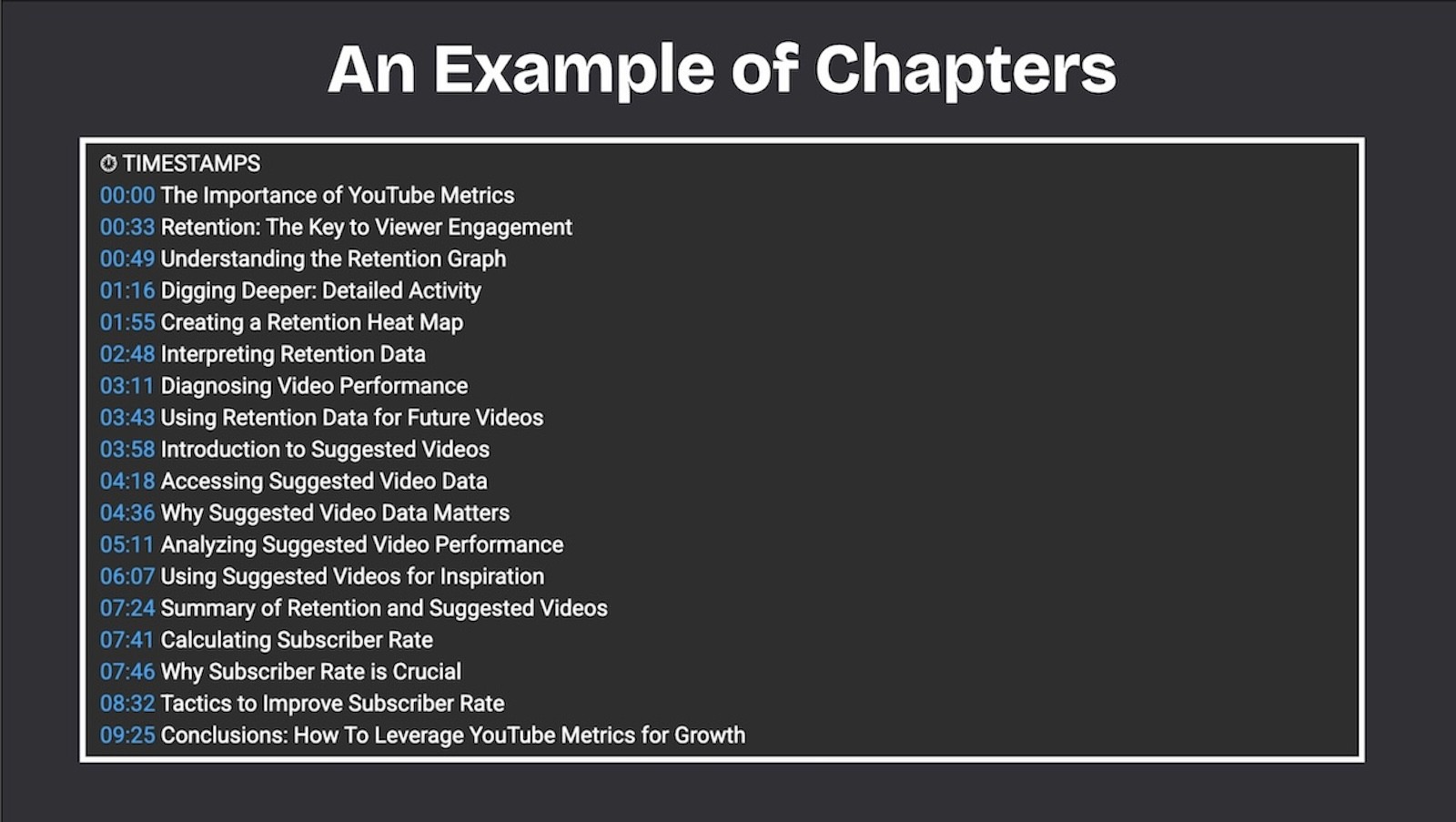
When a viewer clicks on a chapter title, the video jumps to that timestamp. On mobile, chapters appear as a scrollable timeline beneath the video player. In Google search results, individual chapters can appear as standalone entries, each linked to the specific moment in the video that addresses a particular query.
How to Add Chapters
Adding chapters requires nothing more than formatting timestamps correctly in your video description. There's no separate tool or feature to enable.
Step 1: In your video description, list timestamps in the format 0:00 Chapter Title. The first timestamp must start at 0:00. If it doesn't, YouTube won't recognise the list as chapters.
Step 2: Include at least three timestamps. YouTube requires a minimum of three to generate chapter markers.
Step 3: Make sure each chapter is at least 10 seconds long. Chapters shorter than 10 seconds won't be recognised.
That's it. Once you save the description with correctly formatted timestamps, YouTube will automatically generate the chapter markers on the progress bar within a few minutes.
Example format:
0:00 Introduction 1:23 Why most YouTube descriptions fail 4:15 The three-layer description structure 7:42 SEO optimisation for descriptions 10:30 The copy-paste template 12:55 Common mistakes to avoid
You can also let YouTube auto-generate chapters using its AI, which analyses the video content and suggests chapter breaks. In my experience, the auto-generated chapters are a reasonable starting point but rarely optimal. They tend to miss the most important structural transitions and produce generic titles that don't help with SEO. I always recommend writing your own.
Why Chapters Matter for SEO
This is the benefit most creators underestimate. Chapters don't just improve the viewer experience; they multiply your search surface area.
Google Key Moments
When you add chapters to a video, Google can display individual chapters as "key moments" in search results. This means a single 15-minute video can appear in Google search for multiple different queries, each linking directly to the chapter that answers that specific question.
For a video titled "How to Run a YouTube Channel Audit," the chapters might cover "channel branding audit," "metadata and SEO audit," "CTR and thumbnail audit," and "analytics audit." Each of these chapters can independently appear in Google search results when someone searches for those specific terms. Without chapters, the video can only rank as a single result for its primary keyword. With chapters, it effectively has four or five entry points into Google search.
At CareerFoundry, we saw measurable increases in both Google search impressions and YouTube search impressions after systematically adding chapters to our highest-performing videos. The improvement was most significant on longer videos (15 minutes or more) with clearly distinct topical sections.
YouTube Search and Suggested Videos
Chapter titles are indexed by YouTube's search system. If your chapter is titled "How to check your YouTube CTR by traffic source," that phrase becomes searchable text associated with your video. This provides additional keyword targeting beyond what your title and description alone can achieve.
Chapters also help the recommendation algorithm understand the specific topics covered in your video with greater precision. In 2026, with Gemini AI analysing video content semantically, the alignment between your chapter titles and the actual spoken content of each section matters. Accurate chapter titles reinforce the semantic signals that drive recommendation accuracy.
How to Name Your Chapters for Maximum Impact
Chapter titles are a micro-SEO opportunity that most creators waste by using generic labels like "Part 1," "Section 2," or "Next Steps." Every chapter title should be a descriptive phrase that communicates what the viewer will learn in that section.
Bad chapter titles:
0:00 Intro
2:15 Part 1
5:30 The main point
8:45 Conclusion
Good chapter titles:
0:00 Why most YouTube channels skip audits
2:15 The six areas every audit should cover
5:30 How to read your retention curves
8:45 DIY audit vs professional audit
The difference is that the second set of titles includes searchable phrases that viewers might actually type into YouTube or Google. Each chapter title is, in effect, a secondary keyword target for the video.
When naming chapters, think about what someone would search for if they only wanted the information in that specific section. Then use that search query, or something close to it, as the chapter title. This approach is consistent with the title best practices we apply to video titles: clarity, specificity, and keyword awareness.
When to Use Chapters (And When Not To)
Use chapters on any video over eight minutes that covers multiple distinct topics or steps. This includes tutorials, guides, interviews, podcast episodes, presentations, and any long-form content with a clear structure.
Use chapters on any video you want to rank in Google search for multiple related queries. The key moments feature is one of the most reliable ways to increase your Google search footprint from a single piece of video content.
Skip chapters on videos under five minutes. Short videos don't benefit much from chapters because the viewer can scan the entire timeline at a glance. Chapters on a three-minute video can feel over-engineered.
Skip chapters on narrative or story-driven content where the viewing experience depends on watching sequentially. A documentary or a storytelling video loses its impact if viewers skip to the conclusion. For these formats, chapters can actually hurt retention by encouraging viewers to jump past the narrative build.
Chapters and the YouTube Description
Chapters live in your video description, which means they interact with the other elements of your description structure. The recommended placement is after your opening summary and primary CTA link but before the body text and footer links.
Description structure with chapters:
Line 1: Video summary with primary keyword Line 2: Primary CTA link [blank line] Line 3-4: Brief expansion on the video's value [blank line] Chapters: 0:00 Section One Title 2:30 Section Two Title [etc.] [blank line] Body text (150-300 words, SEO-optimised) [blank line] Footer links (website, socials, related videos)
This structure ensures that the chapters are visible to both viewers (who scan the description) and search engines (which index the full description text).
Common Mistakes
Starting at a timestamp other than 0:00. YouTube requires the first chapter to begin at 0:00. If your first timestamp is 0:15 or 1:00, chapters won't be recognised.
Using fewer than three timestamps. YouTube's minimum is three chapters. Two timestamps won't trigger the chapter markers.
Chapters shorter than 10 seconds. Any chapter under 10 seconds is ignored by the system.
Generic titles that waste the SEO opportunity. "Introduction," "Part 1," and "Summary" tell the algorithm nothing about what the section covers. Every chapter title should contain descriptive, searchable language.
Not updating chapters when you re-edit a video. If you trim or restructure a video after publishing, the original timestamps will be wrong. Misaligned chapters that jump to the wrong content are worse than no chapters at all.
Relying solely on auto-generated chapters. YouTube's AI can suggest chapter breaks, but the titles it generates are usually too generic to provide SEO value. Use auto-generate as a starting point, then rewrite every title with specific, keyword-aware language.
Adding Chapters to Your Existing Library
If you have an existing video library without chapters, adding them retroactively is one of the highest-ROI optimisations available. Start with your videos that have the most search impressions, the ones YouTube is already showing to searchers, because chapters will improve both the click-through rate from search results (viewers can see that a specific section addresses their exact question) and the video's ability to rank for additional queries through the key moments feature.
You can identify your highest-impression videos in YouTube Studio under Analytics, then Reach, then Impressions. Our YouTube channel audit checklist includes chapter optimisation as one of the standard metadata items to review.
If you want help optimising your video library's metadata, including descriptions, chapters, and titles, a YouTube SEO audit covers the full scope.